Updating K2 Password
Updating K2 Service and App Pool Service Accounts
Recommended Method:
- Use the Setup Manager:
- Access the K2 Setup Manager.
- Uncheck the "K2 Service" and "IIS App Pool" options.
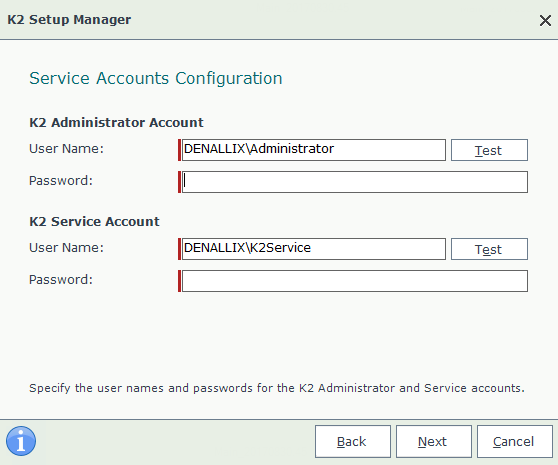
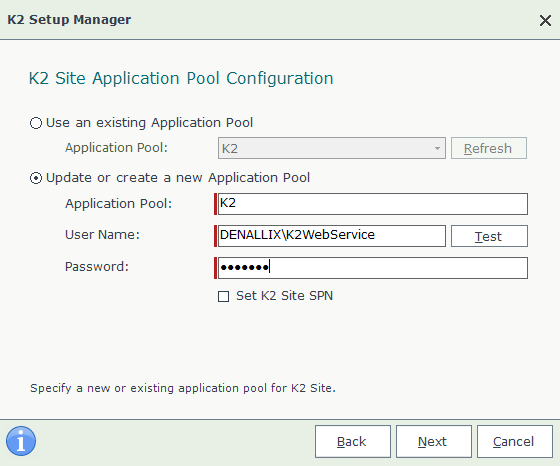
- Enter the new password in the appropriate fields.
- Proceed with the setup process.
Manual Method (if necessary):
- Update Windows Services and App Pool Identity:
- Update the password for the K2 Windows Services and K2 App Pool Identity.
- Important note for Exchange users:
- If using Basic Authentication with Exchange:
- Run ConnectionStringEditor.exe to update the password.
- If using OAuth Authentication (in later versions):
- Password update is not required.
- If using Basic Authentication with Exchange:
- Update Service Instances (if applicable):
- If any K2 Service Instances use Basic Authentication, update their passwords as well.
Crucial Reminder for Manual Updates:
- Ensure consistency for future reconfigurations:
- If you update passwords manually and need to reconfigure K2 later:
- Uncheck the "K2 Service" and "IIS App Pool" options in the Setup Manager.
- Enter the new passwords again.
- This step is crucial to prevent issues arising from cached passwords in the database.
- If you update passwords manually and need to reconfigure K2 later:
Key Points:
- The Setup Manager is the recommended and preferred method for updating passwords.
- Manual updates are possible but require additional steps for consistency.
- Exchange users should be mindful of authentication methods and necessary password updates.
- Proactive password management is essential for K2 service continuity.

Comments
Post a Comment